
 I am homeschooling a high schooler now. I can hardly believe it. Where did the time go? I’m almost certain I started homeschooling him yesterday when he was just a little blond-headed bundle of energy and words. Now he’s a 6’2″ blond-headed young man. And while he’s still full of energy and words, he has grown into himself and I see glimpses every day of who he will someday be. It is so exciting!

With this being Blake’s second year in high school, I feel like we are starting to settle in to a routine that is guided and focused on a goal. Blake knows where he is going and how he is going to get there. He has his classes mapped out and he’s determined to finish strong and early. A big chunk of that roadmap includes computer work, both online and off.
Until recently, we had 2 computers in the home. One was mine, used primarily for blog-related work and household stuff, and one was a school computer used by the oldest two children ages 12 and 15. However, with both children using the computer for multiple subjects (Math, French, Spanish, Composition, Guitar), I found they were both required to chunk up their school day to work around each other and both children were feeling frustrated by the disconnectedness of their day.
Staples.com graciously sent our family a laptop computer to use in our homeschool, so we excitedly welcomed a Toshiba C55-A5281 into our family.

Had you told me a couple of years ago that a laptop was a NEED for homeschooling high school, I probably would have laughed at you, but as my children have gotten older, I realize NEED is not so relative of a term. Our children were born into an internet age. It’s not wrong that we use the internet for schooling and life, as long as we stay aware and engaged as parents and diligently teach them how to navigate its sometimes murky waters.
Before I give you my reasons for believing a homeschooled teen needs a laptop, let me give you my 15 year old son’s thoughts:
I recently got a new Toshiba Laptop from Staples.com to use for my homeschooling. Here are 3 ways I believe a homeschooling teen can use a laptop to enhance their homeschooling education.
1. Everything separated and in one place:
I really enjoyed being able to keep all my school work in one place. As a teen my school work has increased dramatically and it is great to be able to have everything easily accessible without having to sort through others€™ documents or school work. The amount of time I use a computer for school work has also increased and it is nice to be able to have a separate computer that is always ready when I am, allowing our school day to flow better.
2. Staying informed and organized:
I liked being able to check the news or weather quickly when I need to plan something. It is also nice to have my own calendar. In a large family it is sometimes difficult to get an open computer when you need one, so having a separate workstation is an effective way to stay on schedule. Also there are many helpful apps in Windows 8 that can enhance school, like the dictionary or the Khan Academy app.
3. Prepared for college:
As I move into my junior and senior year my work load in school will continue to increase as I prepare for college. My own laptop gives me a tool to stay on track and be able to keep up with new projects.
I really enjoy the freedom and functionality of having my own laptop. It has allowed me to take the initiative and customize my homeschooling to me. If you have a high school student preparing for college, a separate laptop for him or her may be a very valuable tool to add to your homeschool.
~Blake
Homeschooled Sophomore
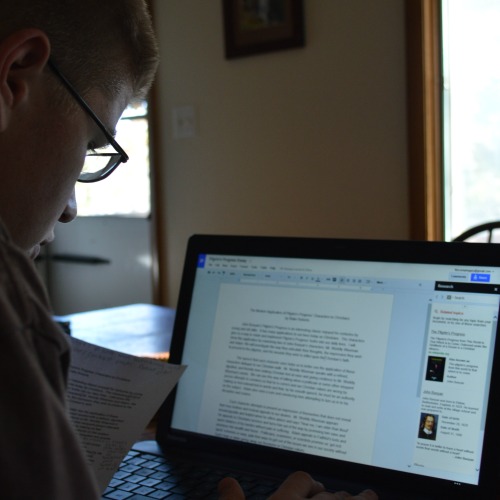
Blake touched on most of the points I would make as a mom. I like the portability of his laptop and the fact that he “owns” his school work more than ever before. But buying a computer always creates questions, so here are a few that come to my mind when I’m looking at computers…
How much should I spend on a laptop? Laptops have become quite affordable in the past several years, so even your teen could save up for one themselves. Purchasing one that could carry them on into college is a fantastic investment. Most of the time, they don’t need a high dollar machine to serve their needs (unless they are going into a computer-related field). Blake’s Toshiba laptop is around $350 and it is plenty of computer for his needs.
How do I choose the right one? I’ve realized along the way that there is no such thing as a perfect laptop, so buy one with mostly good reviews and don’t fret over it too much. I have spent hours reading reviews and have come to the conclusion that no one machine is going to make everyone happy all the time. Buy the best one for your needs. If something isn’t right about it, send it back. You can easily shop online and compare computers to find one that fits your budget and needs. There are regular sales online, and I actually prefer to buy this way as opposed to going out and trying to navigate a crowded store with all the children in tow!
What about office software? We chose not to buy anything extra because Google Drive is FREE and includes a word processor and spreadsheet program that eliminates the need to purchase additional software for your computer. Blake and Megan send me their work to grade this way. Megan also sends her work via Google Drive to her French teacher who happens to live in Nepal (you can read more about that HERE).
We have been quite pleased with having another laptop in the house. It has definitely cut down on the time it takes my older children to do school and has warded off potential arguments over who gets the computer first. Thank you Staples.com!

Janice says
I homeschool and I know for a fact that technology, when guided and moderated by the parent, can be a great tool for learning. It can help a homeschooling day flow better. I have an 8, 4, and 2 year olds at home. The 8 and 4 have Nooks and one of old inspiron laptops to use. The software and apps in all of those were installed by me. And they know they cannot install new apps without my permission – even if it is free. The two year old, I recently started having him use the “Monkey Preschool Lunchbox” app on one of the nooks. So far, he is loving it, and I can see he is using some skills he hasn’t used before. So yes, technology can definitely be a good thing for homeschoolers, if you know how to use it right. 😉
Amy says
Yes, nothing gets downloaded here either. I’ll have to look into that app! 🙂
Janice says
Monkey Preschool Lunchbox is available on android (google play) too – just extra fyi. 😉
Addison says
Hi Amy. I am a 21-year-old mom to a 7-month-old baby. I was a homeschooler from 2nd grade through high school and completed my diploma online. Most of my college courses were online as well. I know you understand that the parent needs to moderate the laptop usage of his/her children, but I just want to emphasize that. I spent so many hours at night doing things that weren’t productive with my laptop, and my parents were very attentive and paid attention to what I was doing. But, things still happen and I often would casually bring it to my room and they wouldn’t notice until I had already wasted valuable time. I’m not doubting Blake’s honesty at all! I’ve just been in his place so recently and it’s very fresh to me the different worlds that you can become involved in on the internet. I encourage a “no laptops in the bedroom” rule, if you haven’t done that already!
I know you’re probably on top of this, just wanted to offer my perspective! It’s strange having so recently been the child, and now being the parent and understanding both sides more clearly than I probably will even a year from now. 🙂
Amy says
Yes, we have the same rule, but thank you for reiterating this because it is so important.
Melanie says
We came to the same conclusion this year and we don’t regret it. My both daughters are able to go where it is quiet in the house to do their works. There is more and more online teaching videos that I find really helpful in high school when I don’t have the answers or when I don’t know well how to explain things. We put good rules around the computer like it goes in the family room for the night, we install K9 (in my opinion, the best free parental program), we told them that nothing is private on the computer and we can go see what is in it at anytime.
Jillian says
I think it’s time for another computer too. I have my 3 oldest doing Teaching Textbooks and someone always ends up waiting for the computer to free up. Including me! lol! 😉
John Wilkerson says
We’re currently homeschooling our 2nd child through high school (our oldest is a Sophomore in college). We’re quickly coming to the realization that we’ll need a 3rd computer soon.
As a geek-dad I want each of my kids to have their own laptop or tablet but I realize that’s just not possible on my income. I’ll have to keep trying to get more life out of my existing hardware.
sajmom says
Thank you, I enjoyed this post. Although I don’t think I would have admitted it out loud, there is a certain amount of guilt over allowing your children to use technology. You worry about how much use is ok, how old is ok to use it……will it harm developing brains,etc. etc. In my house the computer is used by my three oldest-12, 9, and 8 and I do have some mixed feelings about it. I also feel ancient when I’ve had to explain, “No, Mommy was not on the computer at all at your age because we didn’t even own a computer until I was in 11th grade!” That blows their minds!
But realistically speaking it absolutely has it’s advantages. Some of my younger kids have used starfall as a learning to read aid, and we use Khan Academy as a math supplement. My 12 year old also watches videos from the site (and they send me a weekly report of the activities of my students online which is nice!) I use the computer when teaching lessons to look up a better definition for words or to show an illustration of something we have no context for-Little Britches had us looking up a lot of cowboy/rancher terms we weren’t familiar with! Pinterest has a lot of short brain break videos which are very useful with my boys. We watch educational videos together online and I sometimes put one of those LOOOONG classical music videos on you tube for background music while we’re working. We have one family computer and I’ve definitely been thinking about points you mentioned and wishing we had another computer-or two-to use!
Kim Crawford says
Hal and Melanie Young authors of “Raising Real Men”, recommend Covenant Eyes for computer protection. I too have considered a computer for my teen homeschoolers. I am just very cautious of handing them a great tool, that is also very dangerous. As parents, we need to be every mindful of the dangers on the internet and do all we can to guide our children through a life of purity. Hal and Melanie have handled this topic very Biblically in their article, http://www.raisingrealmen.com/2013/10/would-you-leave-heroin-around-the-house/
That being said, I think it is a great idea. I like what your son shared. We are moving in that direction too. I just want to be ready to walk beside my children into this uncharted course with protection in hand.
Kit says
Not to be a downer, but from a realistic standpoint, a $350 laptop probably isn’t going to carry a kid through college these days, especially if they’re only a sophomore in HS right now. Technology has a frustratingly short lifespan now, because the operating systems change frequently and faster computers are being produced all the time, and so the computers just can’t run the programs people need them to run after a few years.
Also, this is a couple years in your future at this point, but I’d plan on buying MS Office for college. My laptop is a Chromebook – no operating system, it just uses Chrome (the browser) to run all the apps – and so I use Google Drive frequently for writing papers. I do love Google Drive – everything is saved in the cloud and I can access it anywhere from any of my devices – but formatting papers in APA and saving them to a word doc messes up the formatting. Lots of powerpoints don’t open well in the Google powerpoint version either, which is really frustrating if you have to collaborate on group projects and keep running into compatibility issues. I now have a desktop with MS Office on it so that I can use word, powerpoint, etc when I need to.
Mandy says
We bought Toshiba computers for our two oldest homeschoolers…one in high school. It has been great! However, learning how to manage the online world with my kiddos is a challenge. How much is too much? It’s a daily learning curve around here. I have had to accept the age in which my children were born and trust God. Some days I do better than others. Great post!
Amy says
Our children have “computer days” and no games until Saturday. We do try to set limits for the “school” stuff too so they aren’t staring at a screen all day long. It is a tough balancing act for sure.
karen Moore says
Any free laptops for honoring student? I need to homeschool now as he is being bullied and grades are suffering because of it
Tammy Aubreh says
I need a second computer 2 kids in home school and only have one
Amy says
How were you able to get a free computer? We are in need of another laptop.
Amy says
Staples sent me a computer to write about back then. This past year, my son found another really cheap laptop for our homeschool from the IT department at his college! I’d even try asking on Facebook – there are always people with extra computers it seems!
Allison says
Hey ok how did you go about getting a free lab top?